
CMS Errors
/ Tags: Publish Errors, Link Errors, Errors, Spelling Errors, Accessibility Errors
The software will automatically check for 3 types of errors: Spelling, Links, and Accessibility.
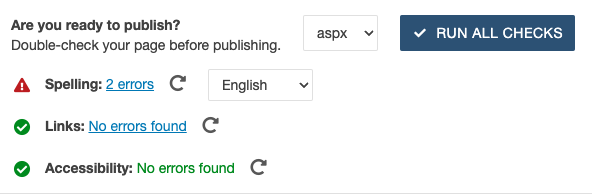 Error checks in Omni CMS
Spelling errors:
This checker will provide similar spell checking to a word document. These aren't
always errors but be sure to double check.
Click the errors link next to “Spelling� to see specifically what it's seeing as an
error. If it's a name, location, or obscure name, ignore the error. If it catches
anything that is really spelt wrong, go back, and correct it.
Link errors:
This will check if any hyperlinks are going to broken pages. If you haven't published the page or pages it's linking to in production, it may mark those pages as broken. If you’re publishing for the first time, any new pages that haven’t been made live will be listed as broken link errors. You may ignore these errors for a new page’s initial publish.
Accessibility errors:
This checker will show you which items are throwing ADA errors. Do not publish if you find any red accessibility errors. Please fix the errors listed so the ADA checker passes as green before publishing. Use the if you need assistance correcting ADA errors. If the errors are unable to be fixed, please submit a .
Share Post