
CMS Local Navigation & Breadcrumbs
/ Tags: Breadcrumbs, Menu, Local Navigation, Editing
Editing Navigation
Navigation is managed by the file “_nav.inc�. This file only accepts bulleted list links.
Insert a link in the navigation file, as follows:
- Check-out to edit the _nav.inc file.
- Click in the bulleted list of links where you want to add the new link and press enter.
- If there are no existing bulleted items, type in text to create one. Press Enter to allow only one bulleted item per line.
- Highlight each item separately to link.
- Click Insert/Edit Link in the WYSIWYG toolbar to open the "Insert/Edit Link" box.

- In the "URL" field, click the file chooser.

- From file chooser, click the name of the new page.
- Click Insert.
- In the "Title" field, enter the name of the page you're linking to.
- "Title" text appears when someone hovers over the link and is used by screen readers. This is important to meet accessibility compliance standards.
- Save your changes.
- Click Publish.
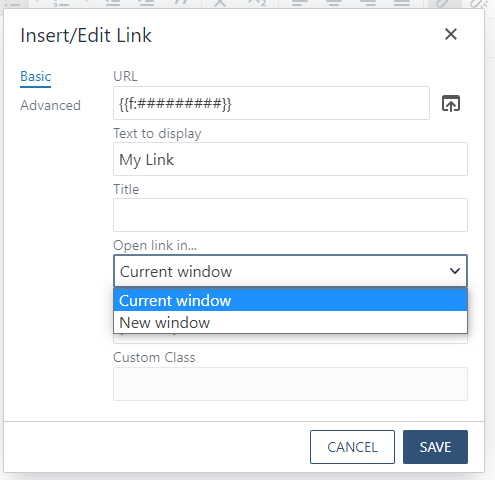
*Only select to open your link in Current Window when editing navigation.
Breadcrumbs
Breadcrumbs are located under the banner image (typically in green text) showing the current page and all previous pages.
 Breadcrumb example
Editing Index Breadcrumb
Similarly, to naming navigation, editing the names of breadcrumbs is done in the properties tab of the “_props.pcf� file. This is available for index pages only.
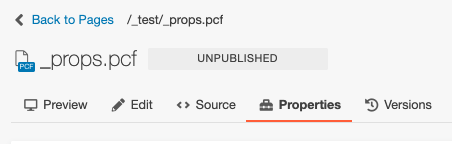 Properties tab in _props.pcf file
Editing Page Breadcrumb
Editing the names of breadcrumbs is done in the properties tab at the top of the page.
 Properties tab
Tag Cloud
Share Post